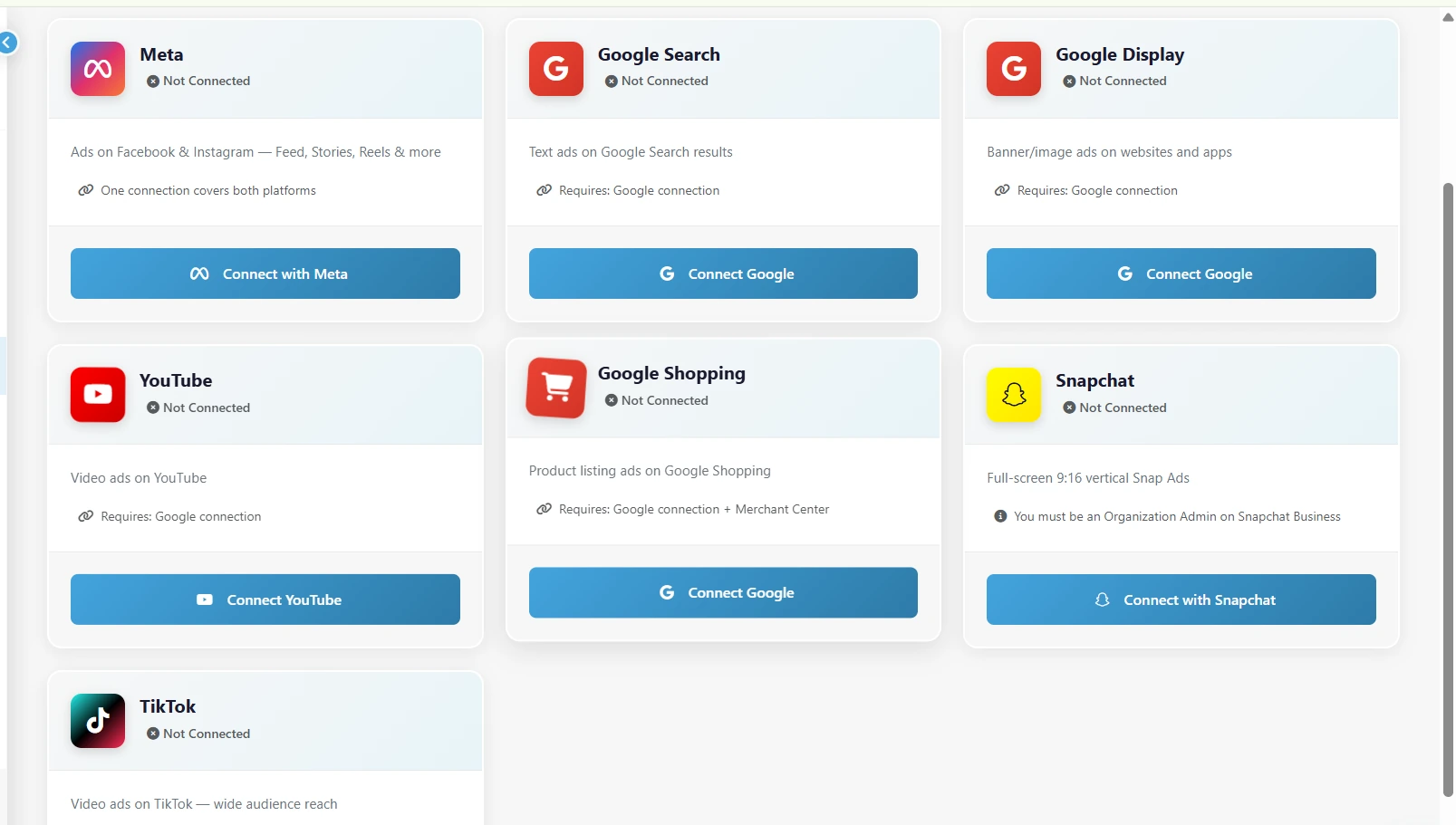
Before any campaign can launch, you need to connect your Google, Meta and TikTok ad accounts, and any other network you plan to use, to the tool that will run them. markXpand builds and launches into your accounts, not its own. You authorise each ad account once from the connections screen and the authorisation persists, which is what keeps the spend, the data and the campaign history yours.
This guide covers why your own accounts matter, how connecting works, what to check on each network before you connect, and what happens between approval and the first ad going live, plus how to keep access secure.
Why your own ad accounts matter
When campaigns run in accounts you own, the spend history, audiences, pixel data and results belong to your business. If you change tools, agencies or staff, all of it stays with you. Running inside someone else's account means starting again from nothing when the relationship ends.
It also means your data builds up over time. Every campaign teaches the network more about who buys from you, and that learning stays in your account.
How connecting works
Connecting uses each network's own sign-in. You log in to Google, Meta or TikTok as you normally would and grant permission for markXpand to create and manage campaigns. You never share your password, and you can remove the access later from the same screen.
The permission you grant lets markXpand build campaigns in that account, launch them paused and read back their results. Billing, payment methods and account ownership stay with you, on the network itself.
Who should own the connection
Connect accounts from a login that belongs to your business, not to a freelancer or an employee who might leave. If the person who connected an account loses access, the connection can stop working. Give at least two people in your company admin access to each ad account and business portfolio, so one absence never blocks a launch.
Before you connect: a checklist for each network
Most failed launches trace back to something missing on the network's side. Check these first.
- Google Ads: an active account with billing set up, and your user given Admin or Standard access.
- Meta: a business portfolio that owns the ad account, the Facebook Page and, for website campaigns, the Pixel, with you assigned to each.
- Instagram: an Instagram professional account linked to the Facebook Page you will advertise from.
- TikTok: an approved advertiser account with a payment method, and a verified TikTok account linked as the ad identity.
- LinkedIn: an active Campaign Manager account with billing, and the right Page role for sponsored content.
- Snapchat: a Public Profile linked to the ad account, and a funding source on the organization.
If something does block a launch, the markXpand help center has step-by-step fixes for the common errors on each network.
Test the connection before launch day
Connect each account a few days before you plan to launch, not on the morning itself. That leaves time to fix a missing role, a billing problem or an account review without moving the launch date.
What gets launched where
Google and Meta launch through their official APIs. Email goes out over SendGrid and WhatsApp over Twilio. Where a network is not yet wired for launch, the platform says so on the card rather than implying otherwise.
Each network has its own card on the connections screen, so you can see at a glance which accounts are connected and which still need attention.
Approval is a real gate
Approval is a real gate, not a formality. A campaign cannot launch until an owner approves it, a rejection carries a written comment the creator can act on and resubmit, and when approval lands markXpand pushes to every selected channel in the same moment.
This matters for teams. The person who builds a campaign is often not the person who answers for the budget. With an approval step, the creator can move quickly and the owner keeps control of what spends, without either of them chasing the other through email.
Then everything stops: every ad arrives paused
Then everything stops. Every ad that reaches a network arrives paused, so nothing spends until someone opens the account and presses play. It is the last checkpoint between a generated campaign and your money.
That final check inside each network is worth the extra minute.
- Confirm the budget and the start and end dates.
- Check the audience and the locations.
- Make sure the payment method is active.
- Wait until the ad has passed the network's own review.
Then turn it on, and the campaign starts spending against the budget you approved.
After launch
Connections persist, so the next campaign does not need the setup again. If you disconnect a platform, markXpand's access ends; campaigns that already launched stay in your ad account, under your control.
Keep access secure
- Turn on two-step verification for every login that can reach an ad account. LinkedIn requires it for Campaign Manager, and Google and Meta strongly encourage it.
- Review who has access every few months, and remove people who no longer need it.
- Use roles rather than shared logins: give each person their own access at the lowest level they need.
Common connection problems
- Missing permissions: the connected user lacks a role on the ad account or the Page.
- Billing: no payment method set up, or a failed payment.
- Assets not shared: the Page, Pixel or ad account sits outside the business that is running the ad.
- Account reviews: new accounts on Google, Meta and TikTok are often reviewed before ads can serve, which is routine and usually clears on its own.
- Expired connections: if access is removed or a login changes on the network's side, reconnect from the connections screen.
Fix these once and every later campaign launches without them. Your first three campaigns are free, with no credit card.