Most campaigns that disappoint were decided before launch day. The budget went to a channel nobody could justify, the story ad was a cropped feed post, or the conversion tag was never firing, so two weeks of spend produced numbers nobody trusted. None of that is bad luck. It is a missing step, and catching missing steps is what a marketing campaign launch checklist is for.
Why a launch checklist beats a launch plan
A campaign launch plan says what you intend to do. A checklist says what has to be true before money moves. Plans are written once and admired; checklists are run every time, by whoever is launching, and they do not care how confident anyone feels on the day.
The list below follows the order the work actually happens in. Each check depends on the ones above it, so if one fails, stop and fix it rather than skipping ahead. A campaign with a vague objective cannot be rescued by better creative.
1. Write down the one thing the campaign is for
Pick a single objective: Sales, Leads, Traffic or Awareness. Not two. The objective decides how each network bids, how the budget should lean and what the copy is asking people to do, so a campaign that wants sales and awareness at once usually ends up optimised for neither.
- Is there exactly one objective, written down?
- Does everyone approving the campaign agree on it?
- Do you know what a result looks like: a purchase, a form, a visit or a view?
2. Describe who it is for, specifically
An audience is a person, a place and a reason to act now. 'Women aged 25 to 45 in the UAE' is a targeting setting; 'working parents in Dubai who order snacks for the office' is an audience you can write an ad for. Start from the product, then translate that description into the locations, age range and interests each platform can actually target.
- Can you describe the buyer in one sentence?
- Do the locations and age range match that sentence?
- Are you writing in the language your audience reads: English, Arabic or both?
3. Look at what competitors are running now
Before you write a word, look at who is bidding against you today: what they charge, the angle their ads lead with and the gap they have left open. A category report you could have written yourself does not count. The point is to avoid launching the same offer, in the same words, into the same feed.
- Do you know the three to five rivals your buyer will also see?
- Have you found an angle none of them is using?
4. Choose channels with a reason for each
Every channel on the list should come with one sentence explaining why it suits this product and this objective. If you cannot write that sentence, drop the channel. A modest daily budget spread across six networks usually buys six campaigns that never get enough data to optimise; the same money on two well-chosen channels gives each one room to learn.
- Does every channel have a written reason?
- Is the number of channels realistic for the budget?
5. Split the budget on purpose
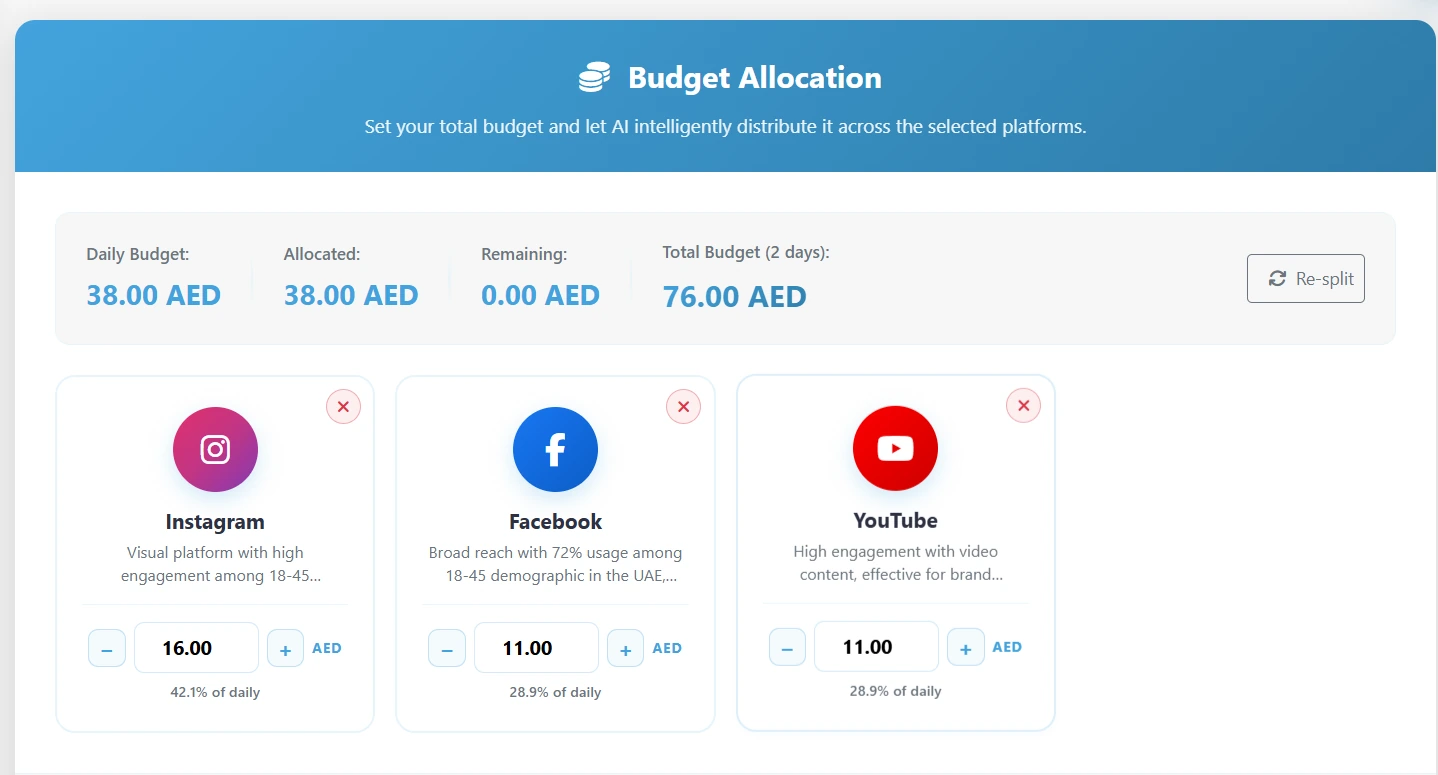
Decide the daily number first, then divide it across the channels you kept and note why each one gets its share. Treat the split as a starting position, not a verdict. You will move money once real results arrive, so the first version only has to be defensible.
- Is the daily budget set in the currency your ad accounts bill in?
- Can you explain each channel's percentage?
- Is there enough per channel to learn from in the first week?
6. Write copy for each placement, not one ad for everywhere
Each network has its own character limits, headline counts and asset rules, and a story is read differently from a search result. Write to the placement: short and direct where space is tight, more detail where the format allows it. Keep one message across channels, and change the words to fit each one.
- Do headlines and descriptions fit each network's limits?
- Does every ad have a clear call to action that matches the objective?
- Has someone who did not write the copy read it for mistakes?
7. Make creative in every ratio you will run
A story is not a cropped feed post. Produce each format as its own image or video, 9:16 for stories and reels, 1:1 for the feed and 16:9 for display and video, so nothing important lands under a caption or outside the safe area.
- Is there a version of each creative for every placement you selected?
- Are the product and the offer readable on a phone screen?
8. Check the landing page and the tracking
The ad's job ends at the click; the page has to finish it. Make sure the landing page says what the ad promised, loads quickly on a phone and has one obvious next step. Then confirm that the result you chose in step one is actually being recorded, because a campaign that cannot see its results cannot be improved.
- Does the landing page match the ad's offer and language?
- Does the conversion tag or pixel fire on a test visit?
- Are your links tagged so you can tell channels apart in your analytics?
9. Connect the ad accounts you will launch into
Launch into accounts your business owns, so the spend, the data and the history stay with you. Connect each one before launch day, check that the billing method is active and confirm you have permission to create campaigns. Last-minute access problems are one of the most common reasons a planned launch slips.
- Is every ad account connected, with billing set up?
- Is the account owner available on launch day?
10. Approve once, and launch paused
One person should own the final approval, and a rejection should come with a written reason the creator can act on. When the campaign does go out, have every ad arrive paused so the last look happens inside the ad account itself, and nothing spends until someone turns it on.
- Has the owner approved the whole campaign: copy, creative, budget and channels?
- Did every ad arrive paused, ready for a final check?
After launch: the first two weeks
The checklist does not end at launch. For the first few days, watch spend and delivery rather than results: is each channel spending, and is anything stuck in review? After a week, compare channels on the same numbers (spend, clicks, CTR, conversions and cost per acquisition) and move budget toward what is working. Change one thing at a time, so you can tell what made the difference.
How markXpand runs this checklist for you
markXpand is built around this order. You choose the objective, and it drafts the audience from your product, researches your competitors live, recommends channels with a written reason for each, splits the daily budget into figures you can edit, and writes copy and creative per placement in every ratio. An owner approves once, the campaign launches into your own connected accounts, every ad arrives paused, and the results come back on one set of numbers with recommendations attached.
You can run the whole checklist on your own product: your first three campaigns are free, and no credit card is needed.